Documentation / How to
The Coach — How to use it
There are two ways to get Coach advice: run sitespeed.io and let it do the work, or call the coach-core library directly from your own pipeline.
With sitespeed.io
The Coach is enabled by default. Run sitespeed.io as you normally would — the result page shows the Coach scores and the per-rule advice with no extra flags.
sitespeed.io https://www.sitespeed.io/The HTML report renders the Coach output, and the same data is available in coach.json under the result directory. If you send metrics to InfluxDB, Graphite or Prometheus, the Coach scores ship along with them.
As a library: coach-core
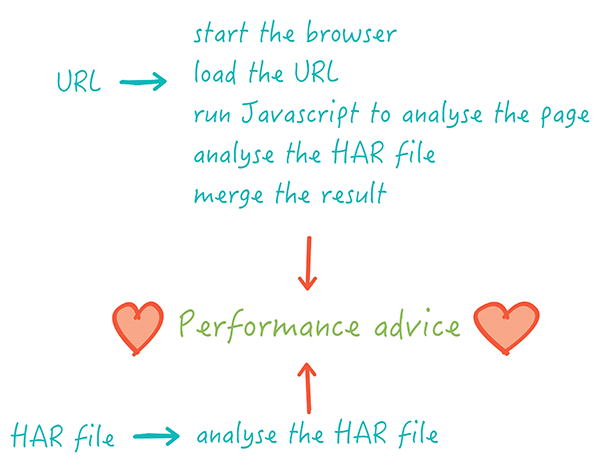
If you have your own browser pipeline (custom WebDriver runner, headless service, internal tool) and you want Coach advice in the result, install coach-core and call it directly. coach-core is a pure ESM package and requires Node.js 20 or later.
npm install coach-coreThe library expects two inputs you produce yourself:
- The result of running the Coach's DOM script in a browser.
- The HAR file for the same page load.
The flow:
import {
  getDomAdvice,
  getHarAdvice,
  analyseHar,
  merge,
  pickAPage
} from 'coach-core';

// 1. Get the JavaScript that inspects the page and run it in your browser.
const domScript = await getDomAdvice();
const domResult = await yourBrowser.evaluate(domScript);

// 2. Take the HAR you produced for the same run. If it has multiple pages,
//    pick the one you want to analyse.
const har = await yourBrowser.getHar();
const page = pickAPage(har, 0);

// 3. Run the HAR rules. Pass the DOM result so HAR rules can use it.
const harAdvice = await getHarAdvice();
const harResult = await analyseHar(page, harAdvice, domResult, {
  // any options you want to forward, for example { mobile: true, browser: 'chrome' }
});

// 4. Merge the two into the final Coach result.
const coachResult = merge(domResult, harResult);
coachResult has the same shape as the coach.json written by sitespeed.io: per-category scores, per-rule entries with score, weight, severity, advice text and the offending list.
The library also exposes a few helpers:
getThirdPartyWeb()andgetThirdPartyWebVersion()— the third-party-web data the Coach uses for third-party detection.getPageXray()— the PageXray instance used to convert HAR to a page summary.getTechnologiesVersion()andgetWappalyzerCoreVersion()— versions of the technology-detection data.
Browser support
The Coach is tested against the latest Chrome and Firefox. Most rules also work in Edge and Safari, but we don't run automated tests against them — file an issue if a rule misbehaves in another browser and we'll take a look.